

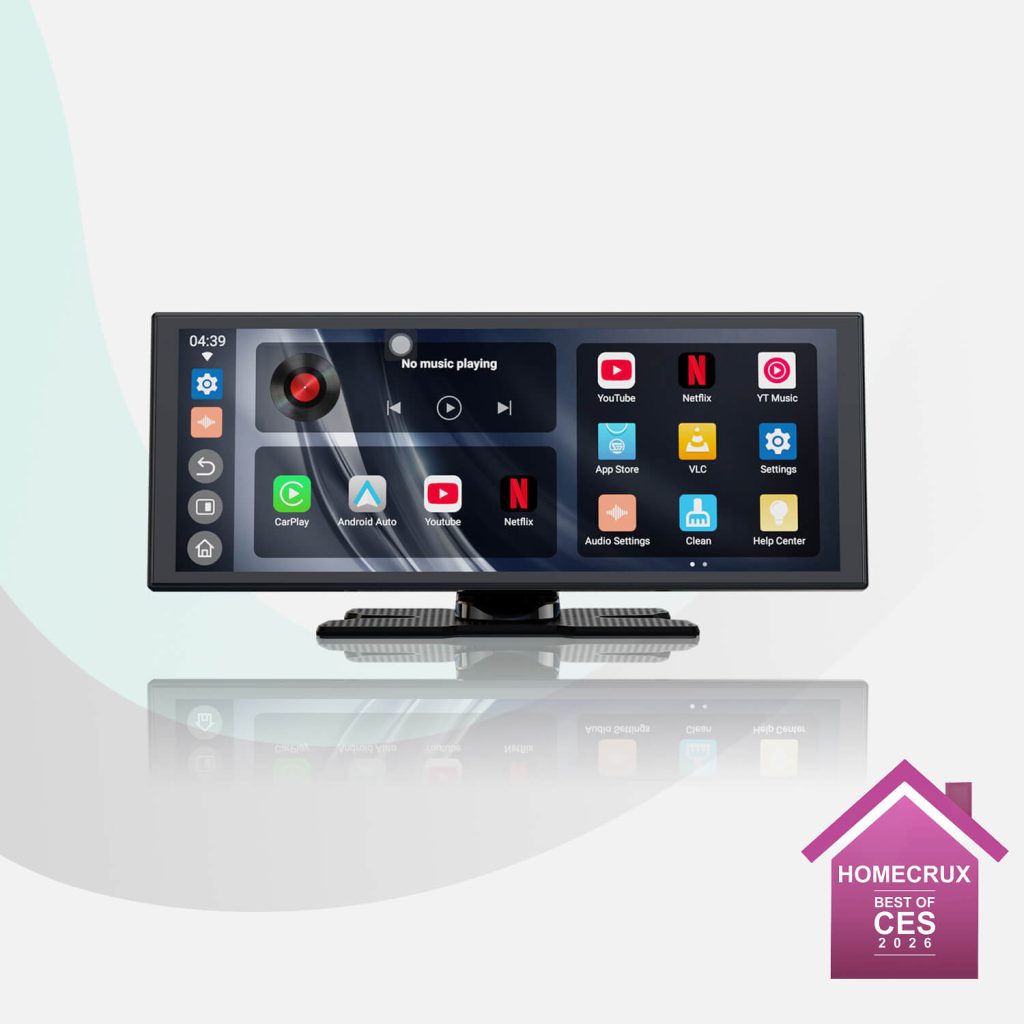
The ScreenFlow Portable Car Display Screen is OTTOCAST’s standalone display for adding navigation, phone connectivity and entertainment to a vehicle without replacing its existing stereo. The product page describes it as a plug-and-play unit for cars, trucks, boats, RVs and motorcycles, with wireless Apple CarPlay and Android Auto alongside built-in streaming apps. Ottocast presents ScreenFlow as a portable screen rather than a wireless adapter that depends on a factory-installed CarPlay system.
That distinction shapes what the product is meant to do. ScreenFlow has its own Android 13 operating system and a touchscreen, while also offering wireless phone projection. The stated feature set includes an 11.4-inch display, touch response described as smooth at 60 frames per second, split-screen viewing and several ways to route audio through a vehicle’s speakers. Its appeal, as the manufacturer presents it, is combining these functions in a movable screen that can be installed without taking apart the dashboard.
A separate display, not a replacement stereo
ScreenFlow’s central idea is to add a screen to a vehicle while leaving the original in-dash system in place. OTTOCAST says users can avoid the complex installation and disassembly associated with replacing an aftermarket stereo. The product is described as ready to use after plugging it in, with the company promoting setup in minutes. The listing does not provide detailed installation steps or specify the exact power connection, so buyers should consult the product instructions for those particulars.
The portable format also matters for people who use more than one vehicle. In its FAQ, OTTOCAST says ScreenFlow can be moved between vehicles; the user would need to remount the bracket, reconnect power and accessories, and may need to pair a phone or complete initial setup again. This makes the unit different from a screen integrated into one dashboard, though moving it still involves repositioning its mount and reconnecting it.
The page describes compatibility broadly, naming cars, trucks, boats, RVs and motorcycles. It also specifically says the device is intended to work with vehicles that do not have a built-in screen, and its FAQ clarifies that ScreenFlow is a standalone plug-and-play display. That is separate from the site’s general compatibility notes for Ottocast wireless adapters, which require factory-wired CarPlay or Android Auto. Those adapter requirements should not be confused with ScreenFlow’s stated standalone design.
Phone projection and the Android interface
ScreenFlow combines two kinds of use. Wireless Apple CarPlay and Android Auto provide a way to connect a compatible phone for the respective phone-projection systems. Separately, the product page identifies Android 13 as the operating system and advertises built-in streaming apps. In other words, the advertised entertainment functions are not limited to projecting a phone’s display: the manufacturer presents the screen as having its own Android-based functions as well.
The available material does not enumerate every included streaming app, explain whether individual apps require separate accounts, or describe the network requirements for each one. The product page does call the apps built in, but it does not provide enough detail to establish which services are available in every region or how they are updated. People considering ScreenFlow for a particular app should verify that app’s availability and requirements rather than assume it is included.
For phone projection, the page emphasizes wireless connectivity, describing CarPlay and Android Auto as cable-free. It does not specify every supported phone model or operating-system version. Nor does the supplied product information list a complete compatibility matrix for vehicle makes and years. Since ScreenFlow is presented as a standalone display, the FAQ’s rule of thumb for wired-factory-CarPlay adapters is not a suitable test for this product. Checking the ScreenFlow-specific setup instructions and phone requirements is the more relevant step.
OTTOCAST also says the device can be used with a phone hotspot. That offers one stated way to provide internet access for online use, but the material does not set out data consumption, cellular coverage requirements or offline functionality. These details can affect the usefulness of streaming and other connected features on the road, so the page’s broad promise of built-in apps should be read alongside the practical need for an available connection where online services are used.
Display, touch and split-screen use
The product title and key features specify an 11.4-inch screen. Elsewhere, the marketing copy calls it an 11-inch display, so the page uses both descriptions; 11.4 inches is the more precise figure in the product heading. OTTOCAST also describes touch operation as smooth at 60 frames per second. That is the company’s characterization of the interface, not an independent measurement provided in the material.
One prominent feature is split-screen mode. OTTOCAST says ScreenFlow can keep navigation visible while video runs alongside it, positioning the function for situations where a driver wants directions on screen while a passenger watches content. The company’s FAQ includes an important safety qualification: video should be played only when parked or for passengers. The split-screen feature should therefore not be read as an invitation to watch video while driving.
The listing also mentions a customizable interface and day and night modes. These options suggest that the screen’s appearance can be adjusted, but the source does not describe the available themes, brightness settings or extent of customization. It is reasonable to treat them as interface features rather than assume more specific display controls that the page does not document.
Navigation is presented as a core use, alongside entertainment. The page refers to real-time navigation and says users can view navigation while watching video in split-screen. It does not identify a particular map provider or say whether navigation is handled by an onboard application, a projected phone app or both. As a result, the exact navigation experience will depend on the software and connection in use, details that are not fully set out in the source material.
Audio, accessories and practical setup
OTTOCAST says ScreenFlow can send audio to the vehicle’s built-in speakers and mentions multiple audio-output options. The product page calls out built-in Bluetooth cars as a relevant setup, and also refers to FM radio and an auxiliary option in its audio guidance. The supplied text does not fully explain how to choose among these methods or which equipment is needed in every vehicle. Checking the instructions for the particular car or boat is therefore useful before relying on a specific audio route.
The standard product listing includes two separately priced accessories: a long-arm bracket intended for ScreenFlow or Screen AI, and a rear-view camera kit for those displays. Their presence indicates optional mounting and camera-related additions, not that either accessory is included with the screen. The source does not explain the camera kit’s installation process, image specifications or compatibility beyond naming the products, so those particulars should be confirmed separately if they matter to a purchase decision.
The page also advertises an expansion port associated with 256 GB. It does not clearly explain the supported storage format, whether a card or another accessory is required, or what types of files or applications can use that capacity. The figure is best understood as a listed expansion-related feature rather than a complete storage specification.
OTTOCAST describes the unit as portable and says it can be moved or set up in minutes. It also markets the screen as plug-and-play, with the goal of avoiding dashboard disassembly. Those statements outline the intended simplicity, but the supplied information does not provide a step-by-step account of mounting, cable placement or setup. Vehicle layouts differ, particularly across cars, boats and recreational vehicles, so the product’s broad compatibility claim does not mean that every installation will be physically identical.
What to clarify before choosing ScreenFlow
ScreenFlow is most clearly defined by its combination of a standalone Android display, wireless phone projection, streaming apps and portability. Before choosing it, readers may want to establish how it will be powered and mounted in their specific vehicle, how audio will reach the vehicle speakers, which phone features they intend to use, and whether internet access will be available for online services. The page names use across several vehicle types, but does not provide detailed fitment information for individual dashboards or vessels.
It is also useful to separate the screen’s stated capabilities from claims belonging to other Ottocast products. ScreenFlow’s FAQ says it does not include an AI assistant; the site points to OttoScreen AI for that feature. This clarification matters because the broader product family includes different devices, and features advertised for one model should not be assumed to apply to another.
In practical terms, the ScreenFlow is presented as an add-on display for people seeking phone-based navigation and a separate entertainment interface without replacing the existing stereo. Its 11.4-inch stated size, wireless CarPlay and Android Auto, Android 13 platform, split-screen mode and portability define the product’s documented role. The manufacturer’s information is less specific about app availability, detailed installation, connection requirements and certain technical specifications. Those are the points to check against the complete product instructions when assessing whether this particular screen suits a vehicle and its intended use.
Get all details about Ottocast
Sponsored by Gabal Global Group, with publishing tools from CheapPlugins.