

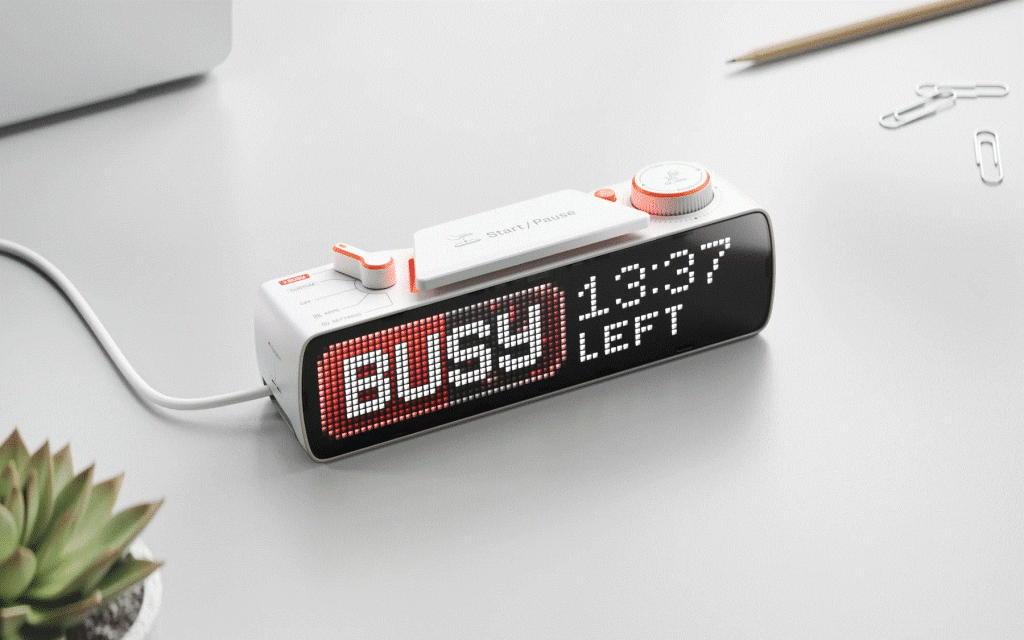
BUSY Bar is a desktop status display built around a practical problem: other people and digital devices may not know when you are concentrating, on a call or ready to be interrupted. Made by Busy, the device pairs a customizable LED message with timers, physical controls and connections to software and smart-home systems. Its role is not limited to showing a “busy” sign; the same device can be used to coordinate focus sessions, display app information or trigger automations.
The product’s distinctive idea is to give work status a visible, physical home. A message on a screen can tell people nearby when you are occupied, while integrations can extend that signal to a computer, phone or compatible home setup. The details matter: some functions depend on the BUSY App, others use local connections or an API, and the product page identifies platform support and certification work that readers should keep in view.
A status display with hands-on controls
The main display is a 6.35-inch RGB LED matrix with a resolution of 72 by 16 pixels. The listed specification gives it a 60 Hz refresh rate, adaptive brightness and support for 16 million colors. That format is suited to short messages, simple graphics and animations rather than dense text. The product description says users can choose a status from a library or create a custom design, allowing the display to communicate a personal message or a workflow-specific state.
A second screen sits on the back: a 1.54-inch monochrome OLED display with 160 by 80 pixels and 16 gray levels. The manufacturer says it mirrors the main display, so the status remains visible from the control side when the front is turned away. A light sensor adjusts brightness on both displays. Together, the two screens address a small but meaningful usability issue: a status sign can face other people while the person using it can still see what it is showing.
BUSY Bar is not controlled only through a computer or phone. Its physical controls include a Start/Pause button, a five-position mode selector, a scroll wheel with a push function, a back button and two RGB status lights. The start button can activate or stop a status, while the selector changes modes. The wheel can set a timer and navigate menus, and the back button exits or moves back through them. The company describes the larger buttons as usable without looking at the device, and says manual controls work without a PC connection or mobile app.
There is also a built-in monitor mount, and the box contents listed on the product page include a wall mount and a two-metre USB-C cable. That gives the device more than one possible placement: on a monitor for a home-office signal, or on a wall or door where a status can be seen before someone approaches. Placement is part of the product’s purpose, because its message is intended for people in the surrounding space as much as for the person at the desk.
Timers and a visible focus routine
The built-in focus timer is inspired by the Pomodoro technique. BUSY describes that approach as alternating 25-minute work periods with five-minute breaks. The company presents its timer as an interval-based version of that routine, with the option to set a simple timer or use intervals. The scroll wheel provides a direct way to set the timer on the device, while the display can show a status and indicate when the user expects to be available again.
This visible end time changes the social meaning of a focus session. “Busy” alone can be ambiguous; a timed status gives nearby people a clearer indication that the interruption is temporary. The device can also be activated manually with its large button, so using it as a basic sign does not require configuring automation first. That makes the central function understandable even before exploring the broader app and integration features.
BUSY Bar also has a distraction-blocking mode. According to the product information, activating BUSY mode can mute notifications on a phone and computer, and the BUSY App can block selected apps during a focus session. The examples specifically include Instagram and TikTok, alongside the ability to choose other apps. The company says those apps cannot be opened until the timer runs out when blocking is enabled. A more restrictive “Hardcore mode” is described as optional and coming soon; it is not presented as an already available feature.
The product pages state that the BUSY App is free and that no subscription is required for managing distractions across a computer, phone and smartwatch. They also say app blocking and notification controls require BUSY App integration. That distinction is useful: the physical device can display a message and run a timer on its own, but blocking behavior relies on the associated software. Readers considering that function should check which devices and operating systems the app currently supports for their particular setup.
Automation for calls, software and the home
Some status changes can happen automatically rather than through a button press. BUSY says the display can respond to microphone activity, camera activity or an active app. Examples on the product pages include automatically showing “ON CALL” when a computer microphone is active and activating a streaming mode when streaming software such as OBS is in use. The site describes integrations with desktop software and notes macOS support, with Windows support identified as coming soon. It also describes a desktop app and mobile apps, but does not provide a complete compatibility matrix in the supplied product information.
Remote control is another part of the design. The product page says users can update the display over the internet, including from another room or across town, and automate status changes for calls. It also describes local access over Wi-Fi, USB and a virtual Ethernet connection. These are different ways to reach the device: cloud access supports remote control, Wi-Fi provides local network access, and USB can create a Virtual LAN connection to the web interface and HTTP API without relying on Wi-Fi or internet access.
Smart-home integration extends the status signal beyond the display. BUSY lists possible actions such as pausing music, turning on lights or locking a door when a busy state is activated. The product information mentions Matter and Apple home and Google home compatibility, while also saying the company’s products are in the process of being certified to work with the Matter standard. That qualification is important: the pages describe the intended integration and certification status, but do not establish that every Matter device or platform configuration will work in every setup.
Home Assistant users have another route. BUSY says the device can connect to home Assistant through its HTTP API, serving either as an automation trigger or as an output. For example, home Assistant can tell the display to show a message when a washing machine cycle finishes; conversely, BUSY Bar can provide a status for an automation to respond to. This makes the device potentially useful outside personal productivity, as a small configurable display for events in a connected home.
Designed to be extended
BUSY Bar’s developer-facing features are unusually prominent in its description. The device includes an open HTTP API, and the company lists libraries for Python and TypeScript. Developers can send text and images from scripts or other systems, and the company says the API is accessible through cloud, Wi-Fi or USB connections. A web interface is also listed for USB and Wi-Fi use. Taken together, these options make the display a possible endpoint for custom status tools rather than a screen limited to the manufacturer’s built-in modes.
The company also describes the firmware as open source, with the shipped code published on GitHub under the GPLv2 license. It says the firmware can be inspected, built from source and forked, and that the device’s modes and services can be extended with custom apps using a documented SDK. These are manufacturer-provided descriptions of the software model, not a guarantee that every component or connected service is open source. Still, the stated API, libraries and firmware access give technically minded owners several ways to investigate how the device works and adapt it.
Network options reflect that emphasis. The wireless processor supports Wi-Fi 6 on the 2.4 GHz band and Bluetooth Low Energy 5.4, with WPA3 authentication listed. BUSY describes cloud connections through its infrastructure or a user’s own server, including MQTT, as well as local network access and USB Ethernet. It says local API access remains available even when the device has no internet connection. For users who prefer not to route every interaction through a vendor cloud, that local pathway is a significant part of the product’s design.
What the hardware suggests about everyday use
The listed hardware includes an STM32U5 central processor, a Silicon Labs wireless processor, 8 GB of eMMC storage, a speaker and a 3,250 mAh rechargeable lithium-ion battery. BUSY gives battery life as up to eight hours of active status. USB-C is used for charging and PC connectivity. These specifications describe a device intended to operate as a standalone object for a working session, while still offering wired control and charging when it is stationed at a desk.
The speaker is listed for sound alerts and notifications, while the main display handles the visual status. Settings include wireless connections, screen brightness, sound volume and power-saving mode. The built-in light sensor adjusts display brightness to the environment. These details point to a product with both a public-facing role and private controls: it can communicate a status outward, while its menus and rear display remain accessible to the person managing it.
The useful way to assess BUSY Bar is to separate its layers. At the simplest level, it is a physical sign with a timer and manual controls. Add the BUSY App and it can coordinate notification muting and selected app blocking across supported devices. Connect it to software or a smart-home system and its status can become part of a wider automation. Developers can use its APIs and firmware to create other behaviors. Which layer matters most depends on whether the goal is clearer communication with people nearby, a structured focus routine, device-level distraction controls or a programmable display.
That range is also why setup expectations deserve attention. A manually activated status does not require the same configuration as automatic call detection, remote cloud access, smart-home actions or app blocking. Those functions have different dependencies, and the product pages identify specific integrations, operating-system availability and certification status rather than implying that every capability works in every environment. For a buyer, the sensible starting point is to identify the intended use, then confirm the relevant app, platform and connection requirements.
BUSY Bar’s central proposition is a small, visible interface between a person’s work state and the systems around them. The LED matrix makes a status legible in a room; the timer gives it a defined duration; physical controls keep the basic interaction close at hand. App controls, automation and an open API expand that foundation for people who want their focus state to influence notifications or connected devices. Its appeal rests not on one timer feature alone, but on connecting a simple human message to a configurable set of digital behaviors.
Sponsored by Gabal Global Group, with publishing tools from CheapPlugins.